





The software platform that turns project images into professional time-lapse-videos
Manage your entire time-lapse workflow from raw image capture to rendered, branded, publication-ready video in the avisec Cloud Cockpit. No editing skills needed, and you’ll never have file management headaches again, since everything happens automatically.
10,000+ Images per Project | Used across 17 countries | API available
Companies that trust us


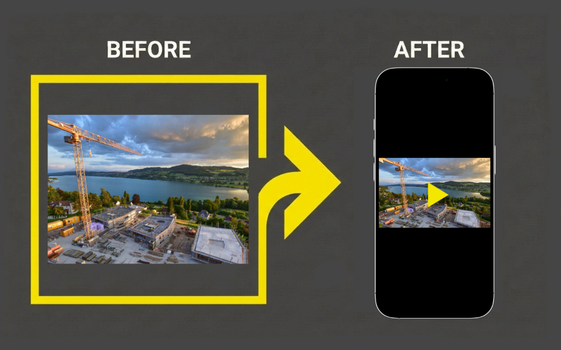
10,000 images & zero time to edit them all
A 12-month construction project at one image every 15 minutes leads to over 35,000 images. Inside that archive are rain-soaked frames, lens flares, night shots with no activity, and hundreds of foggy mornings that add nothing to the story.
For the time-lapse to look good, these kind of scenes have to be sorted out. Additionally, the video has to be stabilized, branding has to be added etc. For most project teams this means that in the end, the images are never used, since the effort is simply too much. So, the marketing team gets nothing and the investor update stays text-only.
The avisec Cloud Cockpit changes this: With automated filtering, stabilization and branding, you get your finished time-lapse-video without lifting a finger.
How the avisec Cloud Cockpit works as a Time-Lapse-Software
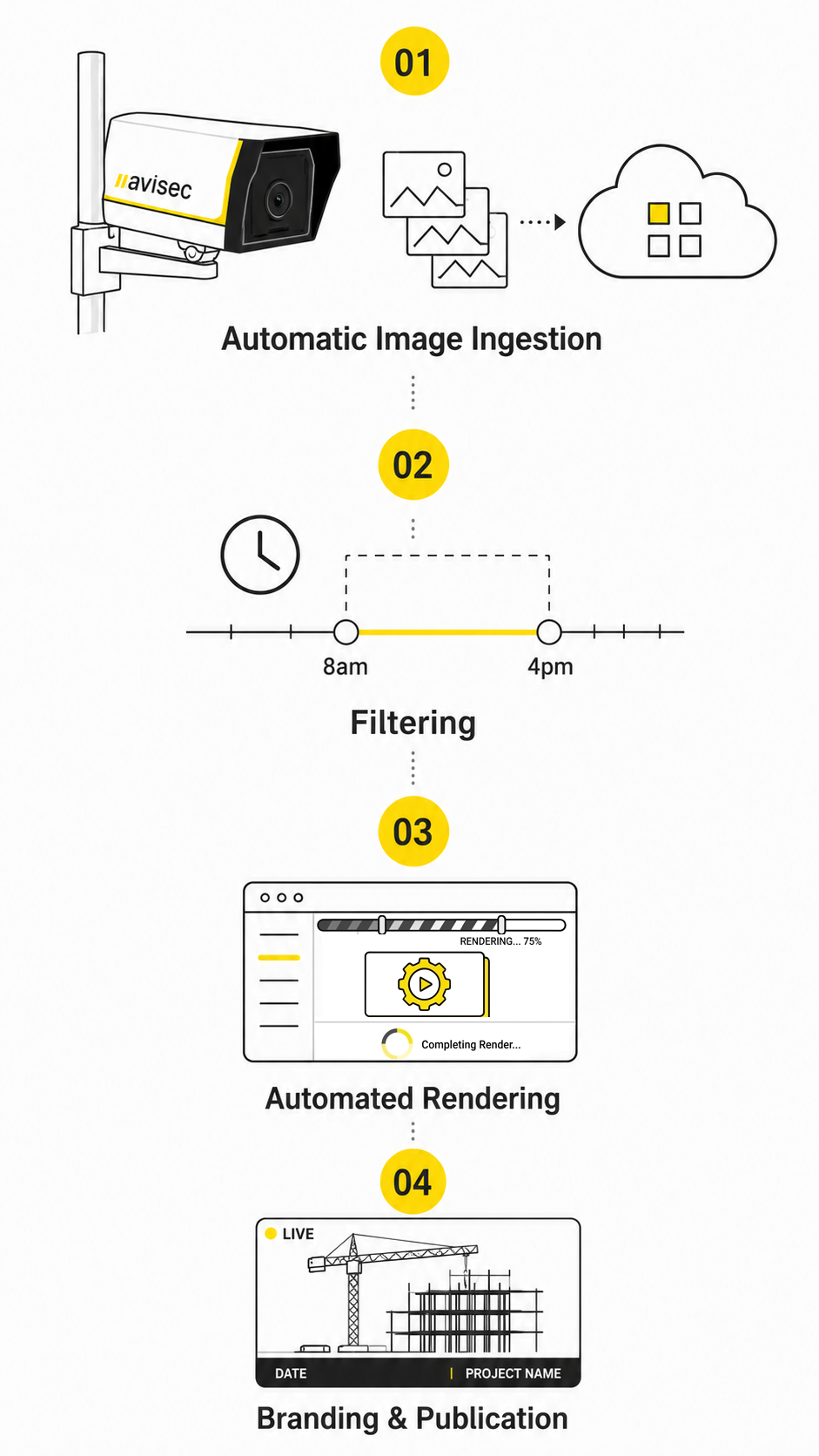
The avisec Cloud Cockpit is the central software platform where every image from every camera lands, gets processed, and becomes usable content. It works in four stages:
- Automatic Image Ingestion:
Every image captured by your cameras (avisec hardware or third-party IP/DSLR cameras) uploads automatically to the avisec Cloud Cockpit. Images are timestamped, archived, and organized by project and camera. This eliminates manual SD-Card collection. - Filtering
Not every image belongs in a time-lapse. That’s why, with Time-lapse Plus tokens, you can set filters that the avisec Cloud Cockpit follows when producing time-lapse videos. For example, you can set a clear time-frame from 8am to 4pm with a break for lunch to eliminate down-time and low-light images. - Automated Rendering:
Configure your time-lapse parameters (time range, video duration, frame rate, resolution) and the platform produces a new video automatically. Rendered videos are available in the dashboard within minutes, ready for download or online-publication. - Branding & Publication
Add your company logo, project name, date stamps, and custom color overlays directly in the platform. Publish time-lapse videos to your website via embed code, so that the feed updates automatically with each new render.
The avisec Cloud Cockpit features that replace manual workflows

Cloud Image Archive
Every image is stored in a structured, searchable archive. Navigate by date, time of day, or project phase. Download individual images at full original resolution (up to 45 MP, depending on your camera-type). Access historical footage from any point during your project, even years after completion.

Automated Time-Lapse
You decide on the start date, end date, video duration and resolution. On that basis, the avisec Cloud Cockpit renders a time-lapse, which is then available on your dashboard. This works without manual intervention, which makes it perfect for weekly stakeholder updates, social media, or adding a progress feed to your website.

Video Stabilization (Deshake)
Wind, vibration, and thermal expansion cause micro-movements across thousands of frames. The avisec Deshake algorithm stabilizes the sequence digitally, producing smooth, professional-quality output, even from cameras mounted on instable mast structures.

Custom Branding Overlays
Video produced through the avisec Cloud Cockpit don’t include an avisec watermark. Instead, you can add your own branding. Your options: Add a company logo, the project name or a date-stamp. We also have a Video-Producer in House to help you add even more custom graphics and animations.

Flicker Reduction
The avisec Cloud Cockpit removes flicker by filtering out specific times of day (e.g., excluding dark evening or morning shots) and adjusting brightness, color, and contrast across frames.

API
Integrate the Cloud Cockpit into your existing project management stack. The API provides access to image capture & archives, time-lapse production, and publication workflows. Use it to automate reporting, feed data into BIM platforms, or trigger renders from external systems.
Three tiers: From automated documentation to cinematic production
Automatic
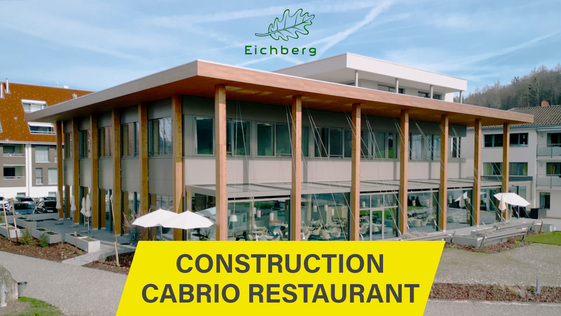
Every day, you can access the latest automatically produced time-lapse directly in the avisec Cloud Cockpit.
You’ll always have material ready for social media, meetings, and project reports.
Your Options:
- Define time-range (1 week, 1 year…)
- Choose the length of your video
- Delay publication
- Custom publication URL
- Add your brand-logo
- Full HD-Resolution
Time-lapse Plus
Everything in the Automatic Feed, plus hands-on control by getting Time-lapse Plus filter tokens.
With filters, you can selectively exclude images and fine-tune the result, giving you full control.
Your Options:
- Reduce Flicker by excluding specific times (e.g. no evening shots)
- Adjust color, contrast and saturation
- Modify frame rate
- Stabilize your video with the avisec deshake algorithm
- Add your brand-logo
- Up to 4K-Resolution
Time-lapse Pro
To achieve the highest video quality, our experts manually curate your images and edit the video with precision.
The result is a time-lapse video perfectly suited for marketing campaigns across all channels.
Your Options
- Removal of flicker and unwanted frames
- Professionally stabilized video
- Added Branding-Overlays
- Only relevant images showing visible progress included
- All key project stages clearly highlighted
- Full photo resolution up to 8K


Publish your time-lapse automatically without legal risk
Most privacy solutions pixelate faces. That leaves visible artifacts in every frame, which is a constant reminder that something was hidden.
The avisec Privacy Protector works differently. It uses a deterministic frame-comparison algorithm to completely remove people and moving vehicles from the published image. The result: clean, publication-ready time-lapse footage with no visible privacy processing.
No competitor offers complete removal. Every alternative on the market uses pixelation or face-blurring that leaves identifiable artifacts. The Privacy Protector is an add-on feature within the avisec Cloud Cockpit, activated per camera.
Already have Cameras on Site? Connect them to the Cloud Cockpit!
The avisec Cloud Cockpit works with any IP camera with FTP capability and we can configure DSLR or DSLM cameras for you. Therefore, if you already have cameras deployed on your construction site, you can connect them to the platform and start generating automated time-lapse videos immediately.
No hardware swap. No new investment. Just connect your existing cameras and let the platform handle the rest.

What our customers say about avisec Cloud Cockpit
“With avisec, we were able to optimize construction site workflows, improve logistics, and save costs because I don’t have to go to the construction site for every small issue. Coordination with trades is also easier. Plus, our customers really appreciate the high-quality time-lapse recordings.”
 Jennifer Urech
Construction Manager
Roth Bau + Planungs AG
“We searched a long time for a reliable time-lapse system and found the perfect partner in avisec. Whether in Germany, Norway or anywhere else, the cameras work flawlessly and deliver stunning footage. This level of reliability gives us peace of mind.”
 Marike van der Ben
Head of Marketing
Nüssli AG
 Simon Peggs
The right view for every Stakeholder
A construction project involves many parties who need visual
updates: the owner wants weekly progress-reports. The investor needs a clean, branded view. The subcontractor only needs their section. And your marketing team wants the best shots, but without workers’ faces.
In the avisec Cloud Cockpit we made it possible to have purpose built time-lapse-videos, image archives and live-feeds for each stakeholder. Everyone gets exactly the view they need, through a simple link.


Feed-level privacy control
Each feed has its own privacy settings: with or without image history or Privacy Protector, instant or delayed publication.

Instant publication stop
Halt any feed with one click. When something sensitive happens on site, you stop the public feed before anyone sees it.
Try the avisec Time-Lapse Software free for 30 days
Create a free account. No credit card required and no obligation.
See how easy automatic time-lapse production can be.
Now is the right time to make time-lapse production effortless
Get your credentials for a free 30 day trial instantly.
If you want, our project manager, Pascal, will introduce you to the avisec Cloud Cockpit, which gives you one secure dashboard to manage your cameras, images, and time-lapse projects.
What you’ll get in the call:
-
A tailored walkthrough of the Cloud Cockpit features
-
Expert insights on how to streamline time-lapse production
-
Answers on data security and GDPR compliance


avisec: your partner for seamless project documentation
Since 2009, avisec has been the trusted partner for professionals across 17 countries who demand precision and reliability.
What makes us different: Manage multiple cameras from one dashboard with customizable permissions and automated time-lapse creation. And, publish your content with GDPR-compliant privacy protection. No technical expertise required!
Our multilingual expert team provides personalized consultation for projects from small renovations to major infrastructure. With thousands of successful projects worldwide, we combine Swiss engineering with practical know-how.